

Meet Jeff, a workflow engineer at a US SaaS company. His job is to keep support, sales, and operations running smoothly across apps like Zendesk, HubSpot, Slack, and Stripe.
Six months ago, event-driven automation was painful. “Listening for events” meant logging into each platform, configuring webhooks manually, juggling different signature rules, and dealing with late-night debugging when something broke.
Today, Jeff manages dozens of app event triggers from one place inside FlowGenX AI: unified observability dashboard and a workflow builder. He can create, pause, resume, and delete triggers in a few clicks—without platform hopping, without custom webhook code, and without guessing which system is misconfigured.
What Are App Event Triggers?
App Event Triggers are a trigger type in FlowGenX AI that lets you subscribe to events from external applications directly from your workflow canvas.
Examples:
- A new Zendesk ticket
- A HubSpot deal stage change
- A Stripe payment event
- A Slack event callback
You configure the trigger node on the canvas, connect it to your workflow steps, and FlowGenX AI handles subscription, verification, routing, and operational safety.
The Real Problem: Event Integrations Don’t Fail Because of “Events”
Event-driven integrations look straightforward until you manage them at scale.
Every platform has its own “gotchas”:
- Zendesk uses signing secrets
- HubSpot uses HMAC signature validation
- Slack requires timestamp validation to prevent replay attacks
- Stripe rotates secrets and retries deliveries
The hardest part isn’t the code, it’s the cognitive overhead: switching UIs, remembering each platform’s quirks, tracking which workspace/account a subscription belongs to, and hunting through scattered logs when anything goes sideways.
That’s exactly where teams lose time—and where reliability and trust start to erode.
What We Built: One Dashboard for Every Webhook
FlowGenX AI is built on a simple principle:
Every event subscription should be visible, controllable, and auditable from one place.
When you open App Event Triggers, you see a unified table listing every trigger configuration:
- Connector + event type
- Status (active/paused/error)
- Which workflows depend on it
- Quick actions (pause/resume/delete)
No separate logins. No “where did we configure that?” archaeology.
Creating a Trigger Is Builder-First (Not Portal-First)
To add a new trigger, you:
- Drag an App Event Trigger node onto the canvas
- Select the platform + credentials
- Click Subscribe
FlowGenX AI generates a secure custom URL (tokenized per user/tenant) and automatically registers the subscription with the source platform via API. You don’t copy/paste webhook URLs, you don’t wire custom handlers, and you don’t maintain one-off scripts.
Operations Are Built In
- Pause a trigger: events are queued so nothing gets lost
- Resume: processing continues cleanly
- Delete: FlowGenX AI unsubscribes from the platform and removes stale configuration safely
This is the difference between “we built some webhooks” and “we built an event control plane.”
How It Actually Works: The Three-Layer System
To make this enterprise-grade, we designed the system in three layers—each solving a different category of pain.

Layer 1: The Control Plane (User Interface & Orchestration)
This is where users live.
In the workflow builder, you select your connector and credentials from a dropdown and hit Test Connection. Behind the scenes, FlowGenX AI’s subscription manager handles platform-specific API requirements and stores the right metadata so the system remains maintainable.
Key operational win: when credentials rotate or configuration changes, you update once centrally—every dependent trigger inherits the update. No more “change it in five places” failures.
If a trigger breaks (expired token, signature error, API change), the dashboard flags it with a clear error state and explanation so you can fix it quickly—without digging through raw platform logs.
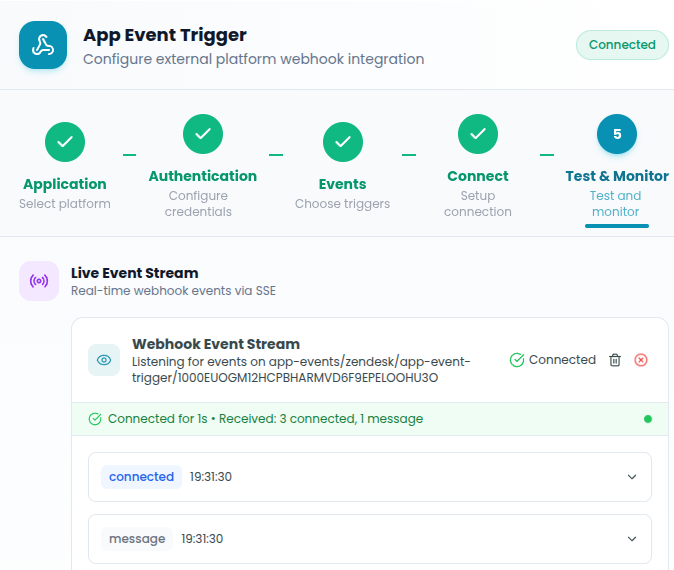
Layer 2: AI Gateway (Token + Signature Validation)
External platforms send event payloads into a FlowGenX AI gateway URL that includes a secure token tied to the customer/tenant context.
When an event arrives, the gateway:
- Validates the token and routes to the correct tenant/workflows
- Applies platform-specific verification automatically (HMAC, signing secrets, timestamp checks)
- Pulls the required secret from a credential vault
- Rejects and logs invalid events
We also handle deduplication because platforms often retry deliveries. By tracking event IDs, we prevent double-processing within a defined window—so your automation fires once per event, not three times because the sender retried.
Layer 3: The Workflow Engine (Routing & Execution)
After validation, the event is matched to the right triggers/workflows and executed through the workflow engine.
One event can fan out into multiple workflows (e.g., enrichment + notification + scoring). The router:
- Skips paused triggers
- Applies user-defined filters (priority, domain rules, conditions)
- Queues execution reliably
If a workflow fails mid-stream, the event is sent to a Dead Letter Queue so you can inspect, fix, and replay—without losing data.
Platform-Specific Intelligence (So You Don’t Have to Remember Quirks)
FlowGenX AI absorbs the messy parts:
- Detects and prevents duplicate subscription patterns where platforms disallow them
- Adds dedupe protections where platforms allow duplicates (and chaos follows)
- Enforces Slack replay protection via timestamp validation
- Surfaces validation failures with actionable messages, not mystery errors
This is the “boring reliability” layer that teams don’t appreciate until they don’t have it.
What This Means in Practice
This isn’t just nicer UX—it changes throughput and reliability.
Typical impact we’ve seen:
- Adding a new trigger: from ~20–30 minutes → 2–3 minutes
- Debugging a failed trigger: from ~30–60 minutes → 2–5 minutes
- Pausing triggers for maintenance: from logging into many platforms → bulk pause in seconds
- Compliance/audit questions: answered from one dashboard with traceability instead of institutional knowledge
It’s not just faster, it’s more governable. And that’s what enterprises actually need.
Why This Matters
When event subscriptions are scattered across tools, teams treat them like fragile plumbing. They avoid change. They hesitate to scale. They accept drift.
By turning triggers into something you manage like infrastructure—visible, centralized, controlled, and auditable—FlowGenX AI turns event handling into a programmable asset. Teams stop acting like platform administrators and start acting like workflow architects.
If you’re already using FlowGenX AI, head to App Event Triggers and consolidate your subscriptions. If you’re new, start with a simple workflow: drag a trigger node onto the canvas, subscribe, and watch it run end-to-end—without the platform hopping.
Stop managing webhooks. Start building automations that just work.
Take the Next Step
Ready to see FlowGenX in action? via URL: https://www.flowgenx.ai/request-demo OR By clicking "Request Demo" Button on top of this page and discover how our intelligent automation platform can help your team cut response times, boost ROI, and deliver next-level customer experiences.
Building production agents? Try our sandbox—configure different privacy methods, see entity consistency in action, test on your own data.

Join the conversation with your LinkedIn or Google account