
In 2024, a Fortune 500 financial services company discovered a costly problem: their sophisticated workflow automation was making decisions in the dark. Despite investing millions in AI-driven processes, their customer service workflows couldn't access the company's decades of institutional knowledge locked away in PDF manuals, SharePoint sites, and legacy databases. The result? Automated systems that were fast, but dangerously uninformed.
Sound familiar? If you're building enterprise automation, you've likely hit this wall: your workflows are only as smart as the data they can reach.
The Problem: Workflows Operating in Isolation
Traditional workflow automation excels at executing predefined logic—routing tickets, triggering notifications, orchestrating API calls. But there's a fundamental gap: these workflows operate in isolation from your organization's collective intelligence.
Every time your automation can't access relevant knowledge, you're sending customers to human agents unnecessarily (costing $15-25 per interaction), making inconsistent decisions across teams, and losing institutional knowledge the moment employees leave.
Database queries only work for structured data. Keyword search is too brittle—search for "customer cancellation policy" and you'll miss documents that say "subscriber termination procedure." And hardcoding knowledge into workflow logic creates a maintenance nightmare.
The Solution: Knowledge Base Node as Your Workflow's Memory
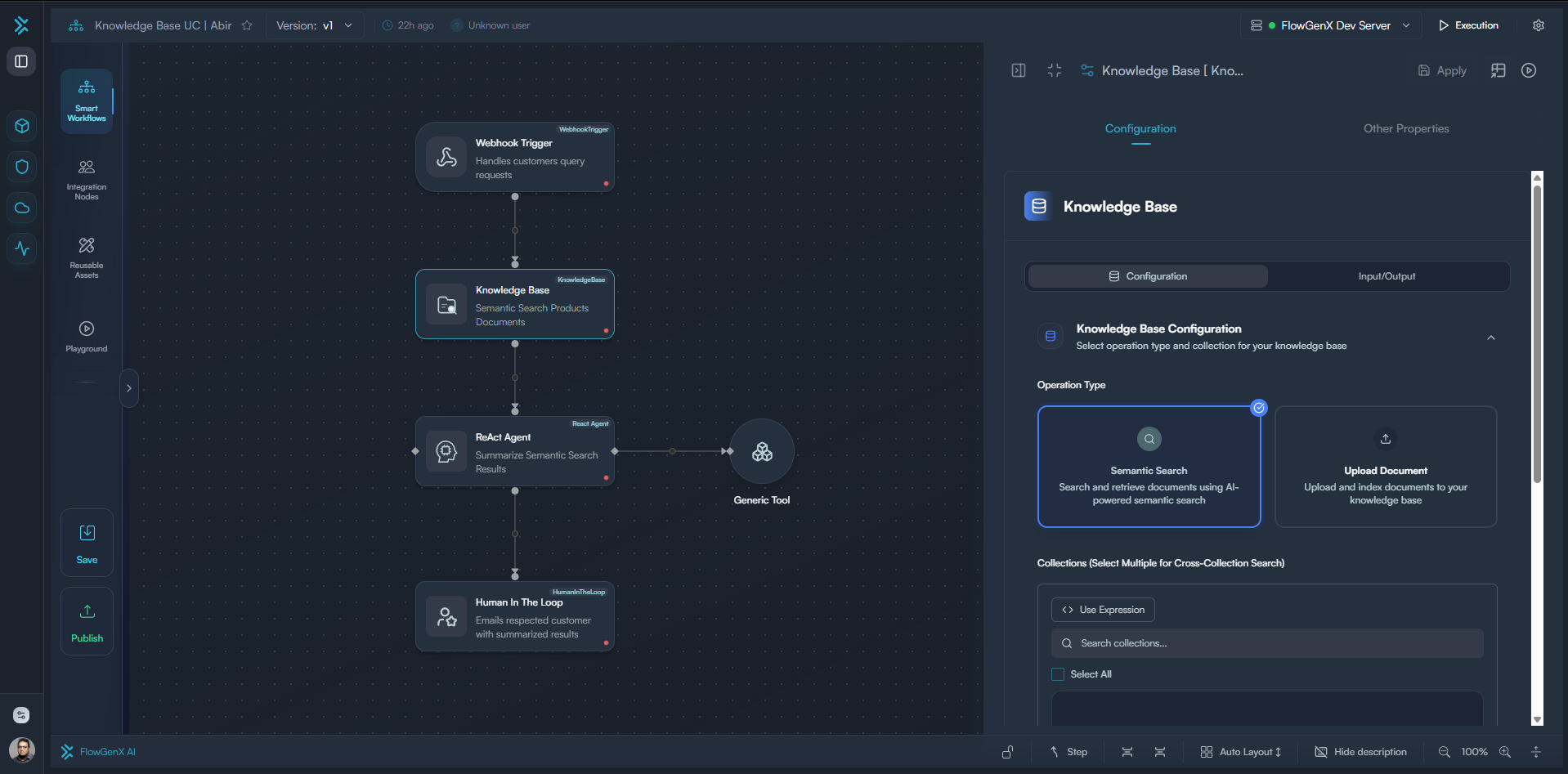
The Knowledge Base node brings semantic intelligence directly into your automation logic. Instead of workflows that blindly execute steps, you get workflows that can:
- Understand context through AI-powered semantic search (not just keyword matching)
- Access institutional knowledge from documents, PDFs, wikis, and historical records
- Make informed decisions by retrieving relevant precedents and policies on-demand
- Search multiple sources simultaneously across departments for holistic intelligence
- Build knowledge over time by uploading documents during workflow execution, creating a self-learning system
Think of it as giving your automation both a photographic memory of your entire organization's documentation and the ability to create new memories—with the intelligence to know which memories matter for each decision.
Real-World Impact: Four Enterprise Use Cases
Use Case 1: Customer Support Automation
The Challenge: A SaaS company with 50,000+ customers couldn't help agents find solutions in their 500+ page technical documentation.
The Solution: An automated workflow triggers when tickets arrive. The Knowledge Base node searches across product manuals, API docs, release notes, and past resolutions. High-confidence answers auto-respond. Partial matches route to agents with relevant articles pre-loaded.
Business Impact:
- 62% reduction in resolution time (4.2 hours → 1.6 hours)
- 40% of tickets auto-resolved with 4.2/5 satisfaction scores
- 23% decrease in escalations to senior engineers
Use Case 2: Regulatory Compliance
The Challenge: A multinational healthcare provider wanted to enforce compliance for popular data privacy regulations (GDPR, HIPAA) as well as personal data privacy concern across 14 countries where they offered their product/service. Compliance officers spent hours on each cross-border case resulting in delays and escalating wait times for customers.
The Solution: When patient data crosses borders, the workflow identifies applicable regulations and queries the Knowledge Base node across thousands of regulatory documents. Full compliance proceeds automatically. Potential violations halt with relevant regulation excerpts attached.
Business Impact:
- 3-hour compliance reviews → 8-minute automated checks
- 100% audit trail with exact regulation references
- Zero violations in 18 months (vs. 3 warnings prior year)
- Market expansion now takes weeks instead of months
Use Case 3: Sales Enablement
The Challenge: Enterprise sales engineers spent 30% of their time hunting for competitive battle cards, case studies, pricing exceptions, and security questionnaires.
The Solution: When deals move to "Technical Evaluation," the workflow analyzes prospect industry, competitors mentioned, and technical requirements. The Knowledge Base node queries across documentation libraries, competitive intelligence, and past responses to create a personalized "Deal Room" with relevant content.
Business Impact:
- 34% increase in win rate for $100K+ deals
- 21 hours/month saved per sales engineer
- Sales cycles reduced from 87 to 62 days
- Consistent content delivery across all reps
Use Case 4: Self-Learning Incident Management
The Challenge: An IT operations team handled 200+ incidents monthly, but knowledge was trapped in Slack threads and individual engineer notebooks. New team members took 6 months to become effective, and similar incidents were solved from scratch repeatedly.
The Solution: When incidents are resolved, the workflow automatically uploads resolution documentation to the Knowledge Base with metadata tags (severity, affected systems, root cause). Future incidents trigger semantic searches against this growing knowledge repository. The system learns from every resolution, building institutional memory that survives employee turnover.
Business Impact:
- 58% of incidents now resolved using past solutions
- New engineer onboarding reduced from 6 months to 6 weeks
- Mean time to resolution (MTTR) decreased 47% (3.2 hours → 1.7 hours)
- Knowledge retention: 100% of resolutions captured vs. ~15% previously
How It Works: Intelligence Without Complexity
The Knowledge Base node operates on four core principles:
1. Dynamic Knowledge Ingestion: Workflows can upload and index documents in real-time—whether it's a customer contract, meeting notes, support ticket resolution, or incident report. The moment your automation processes information, it can contribute that knowledge back to the collective intelligence for future workflows to access.
2. Semantic Understanding: Searches by meaning, not exact words. "Contract termination" finds "cancellation," "ending agreement," and "exit provisions."
3. Metadata-Driven Precision: Documents are intelligently tagged by type, regulatory scope, department, and custom classifications. Workflows can ask: "Find GDPR policies for high-complexity workflows involving customer PII."
4. Confidence-Based Decisions: Every search returns confidence scores (0.0-1.0). High confidence (>0.85) automates decisions. Medium confidence (0.65-0.85) routes to human reviewers. Low confidence (<0.65) flags for expert review.
The Future: Workflows That Think, Not Just Execute
The organizations winning with automation in 2025 aren't the ones with the most workflows—they're the ones with the smartest workflows.
The Knowledge Base node represents a fundamental shift: from workflows as rigid scripts to workflows as intelligent agents that access, understand, and apply your organization's collective knowledge in real-time.
The question isn't whether your automation can access knowledge. The question is: Can it afford not to?
Take the Next Step
Ready to see FlowGenX AI in action? Click on Request a Demo on top of this page and discover how our intelligent automation platform can help your team cut response times, boost ROI, and deliver next-level customer experiences.

Join the conversation with your LinkedIn or Google account