
We've all been there: you build an AI agent that queries your database, another that sends emails, and a third that analyzes documents. Each works perfectly in isolation. Then your CEO asks, "Can we have the analysis agent automatically email the results?" And you realize you've built silos, not a system.
This is the problem FlowGenX's AI Agent & Tool Fabric solves, powered by two emerging protocols: Model Context Protocol (MCP) and Agent-to-Agent (A2A) communication.
The Real Cost of Isolated Agents
Most organizations today run AI agents as disconnected islands. A customer support agent can't leverage insights from your analytics agent. Your research agent can't pass findings to your content creation agent. Each integration requires custom code, authentication sprawl, and maintenance nightmares.
The business impact is tangible: delayed feature delivery, duplicated work across teams, and agents that can't tackle complex multi-step workflows. When a simple task like "analyze this quarter's data and generate a board presentation" requires three different agents, you need orchestration, but without standards, you're building brittle glue code.
Enter MCP: Standardizing How Agents Use Tools
Model Context Protocol (MCP) does for AI tools what USB did for computer peripherals, creates a universal interface. Instead of each agent implementing its own database connector, file system access, or API client, MCP provides a standardized way to expose and consume tools.
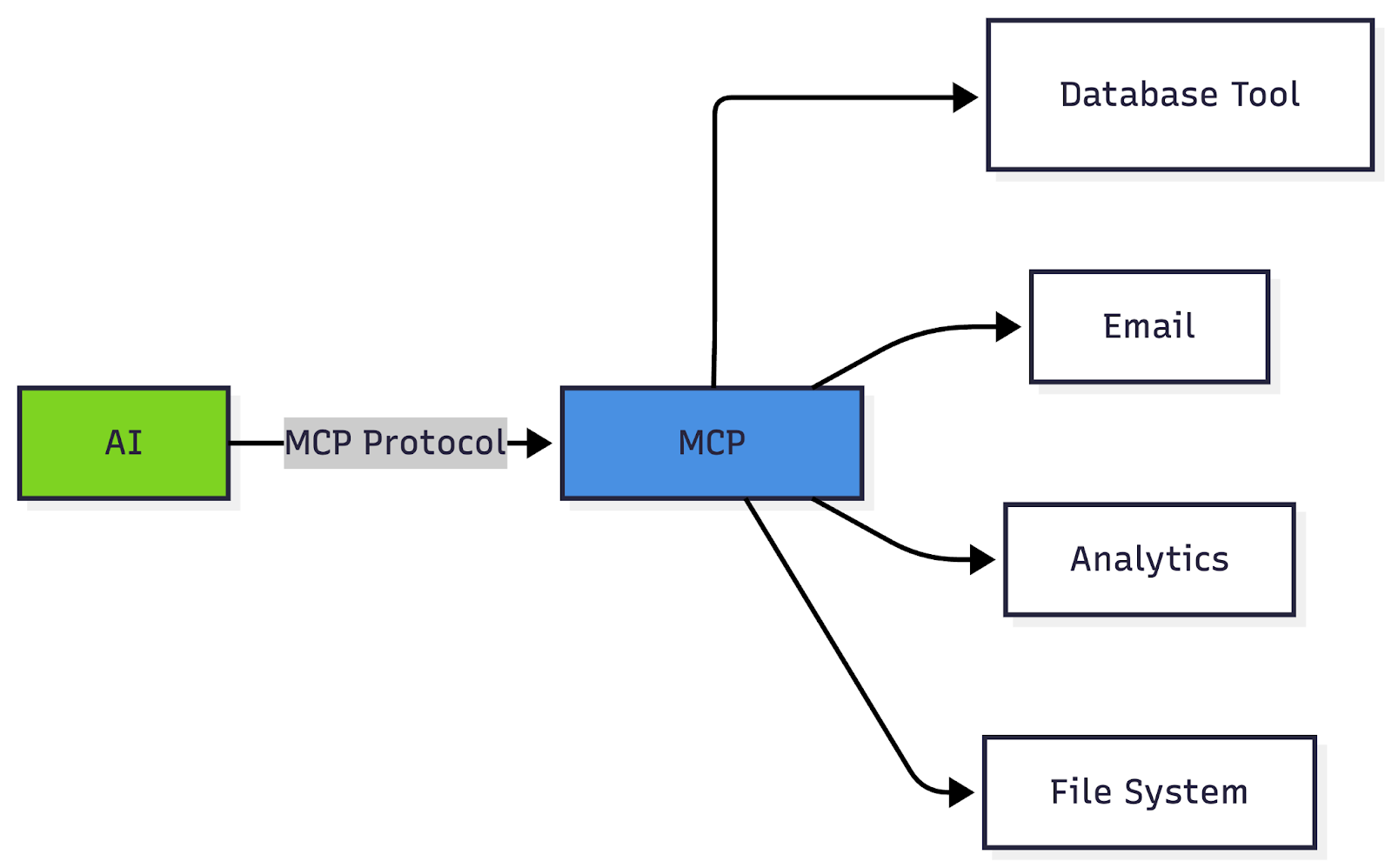
Think of MCP as a tool marketplace for AI agents. A tool developer builds an MCP server oncesay, for Salesforce integration. Now any MCP-compatible agent can use it without custom integration work. The protocol handles authentication, capability discovery, and secure invocation.
The business value is immediate: Instead of spending weeks building custom integrations for each agent-tool combination, your team ships features in days. When you upgrade a tool, all connected agents benefit automatically. Security policies are enforced at the protocol level, not scattered across codebases.
A2A: When Agents Need to Collaborate
While MCP handles agent-to-tool communication, Agent-to-Agent (A2A) protocol enables agents to work together. This is where the real power emerges.
Consider a market research workflow: a research agent gathers data, an analysis agent identifies patterns, and a presentation agent creates executive summaries. Without A2A, you're writing custom message queues, handling state synchronization, and debugging coordination failures.
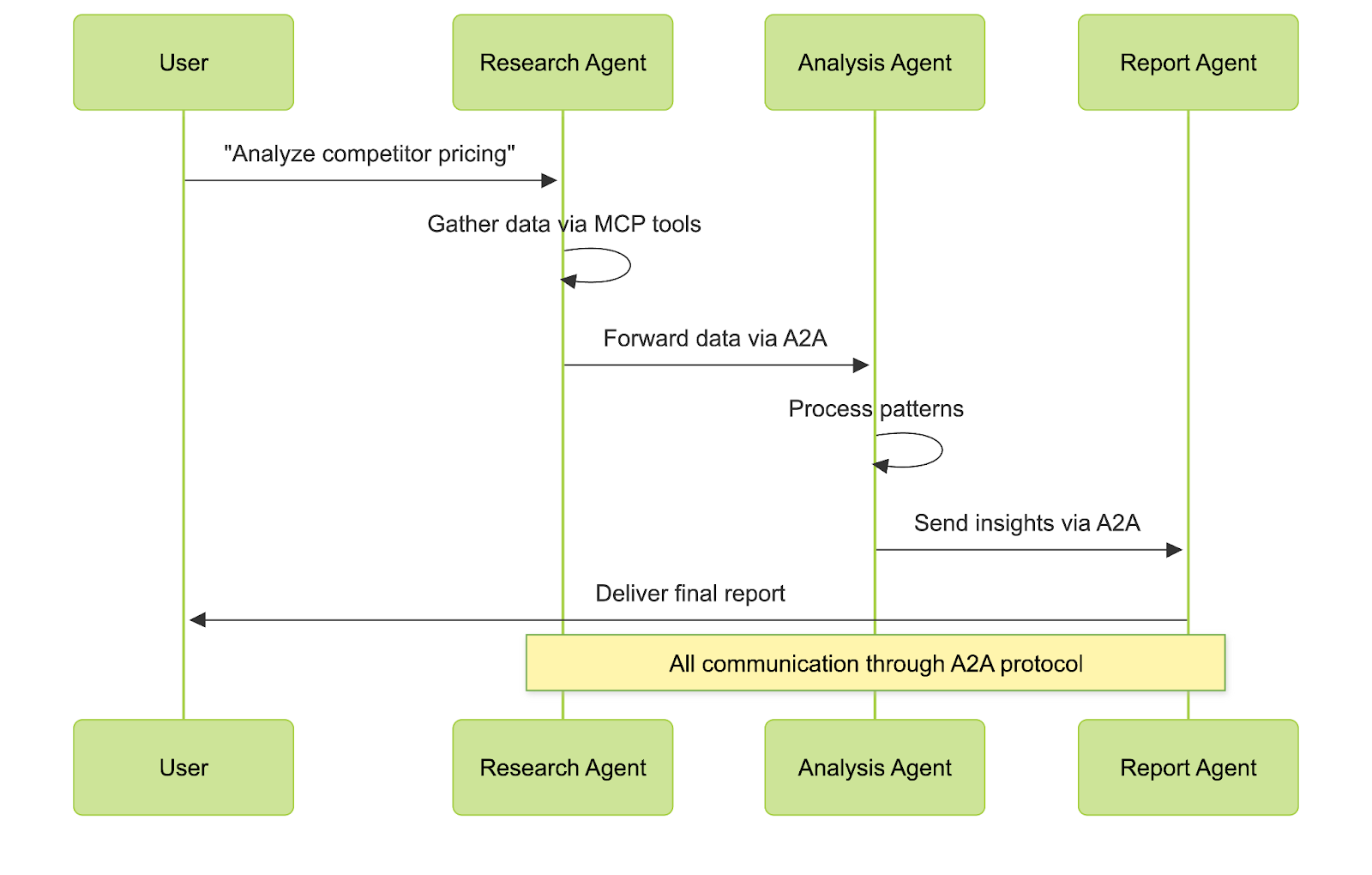
A2A standardizes this choreography. Agents can discover each other's capabilities, pass complex data structures, and handle failures gracefully, all through a common protocol. It's like giving your agents a shared language instead of forcing them to shout across proprietary APIs.
Real-world impact: A customer service workflow that previously required three separate API calls, manual data transformation, and brittle error handling now works as coordinated agent collaboration. When one agent improves, the entire workflow benefits.
How FlowGenX Integrated MCP and A2A
FlowGenX started as an enterprise data workflow platform, helping organizations manage data source credentials, build ETL pipelines, and orchestrate both traditional and AI-powered workflows. We were already solving credential management, job scheduling, and workflow observability. When MCP and A2A protocols emerged, we saw an opportunity to enhance what we already did well.
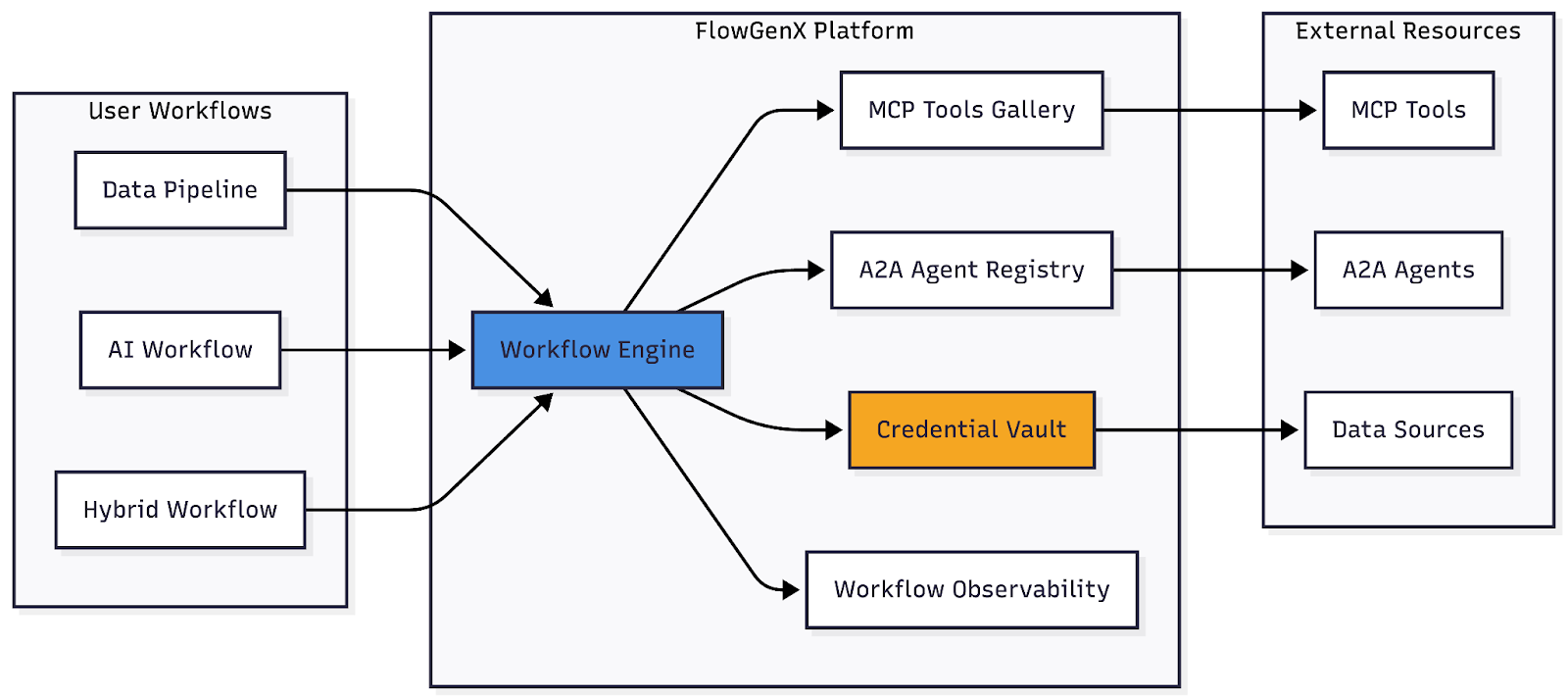
Here's how we integrated these protocols into our existing platform:
MCP Tools Gallery: Extending Workflow Capabilities
Our MCP Tools Gallery lets users browse and add new capabilities to their workflows without writing integration code. Each tool in the gallery is an MCP server that our platform can connect to:
- Data connectors (PostgreSQL, MongoDB, REST APIs)
- File operations (cloud storage, document parsing)
- Communication tools (email, Slack, webhooks)
- AI services (embedding models, LLMs, vector databases)
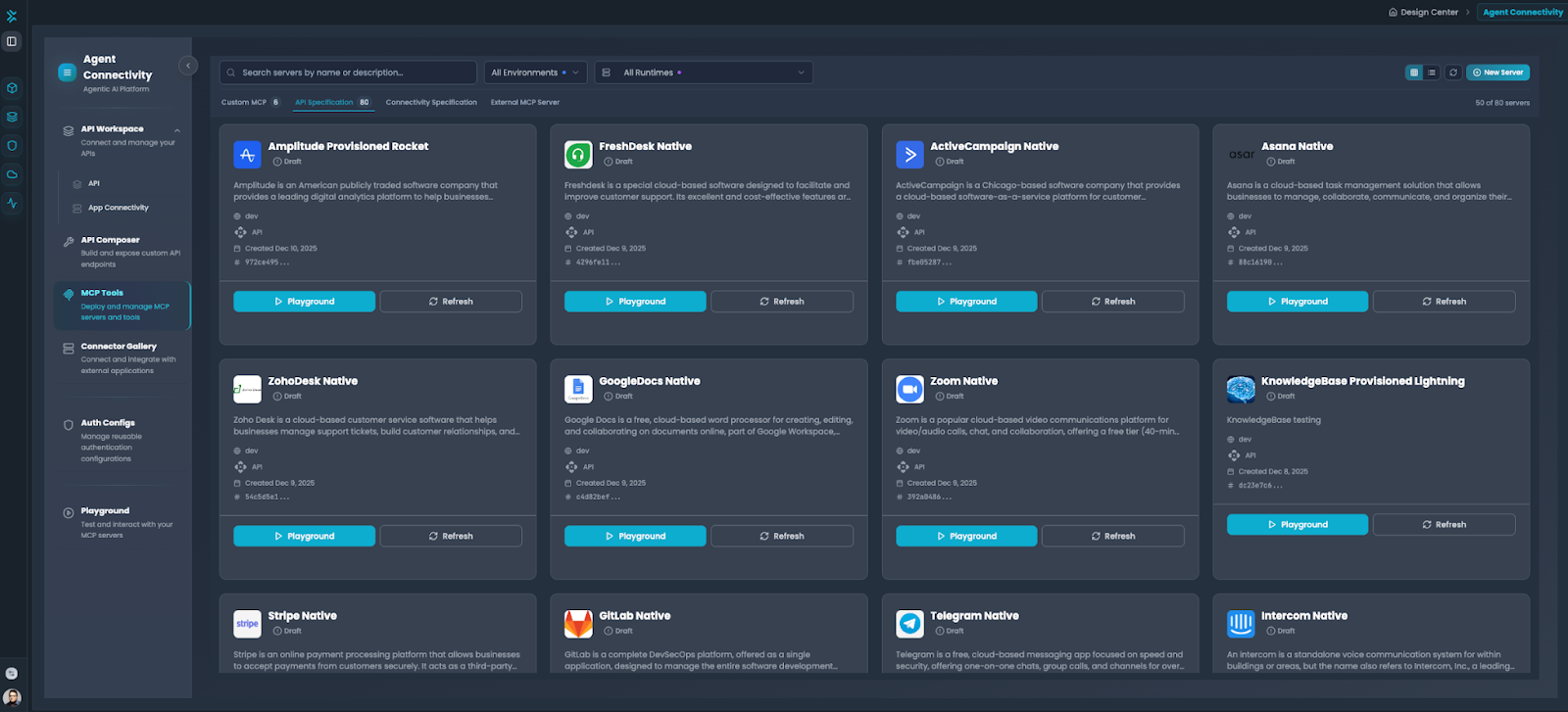
When you add a tool from the gallery, FlowGenX handles the MCP protocol communication. Your workflows simply reference the tool by name, no endpoint URLs, no protocol handling, just the action you want to perform. We manage the credentials through our existing vault system, so the same security policies that protect your database connections now protect your MCP tools.
A2A Agent Integration: Workflows as Agents, Agents in Workflows
The A2A integration works both ways in FlowGenX:
1. Using External Agents in Workflows
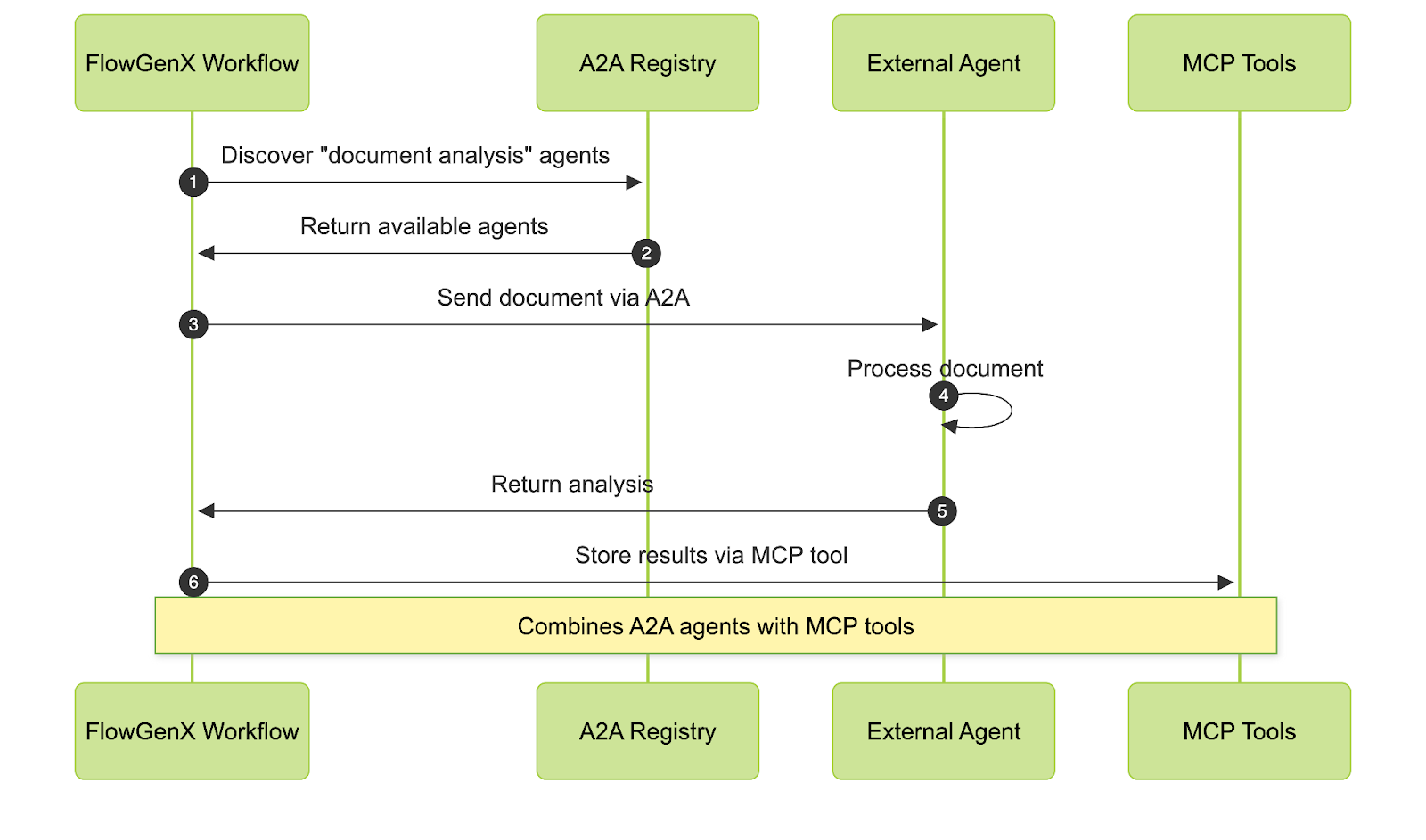
Our A2A Agent Registry (coming soon) will let you discover and connect to external AI agents. Building a document processing pipeline? Add an A2A-compatible analysis agent from another platform. Your workflow orchestrates when to call it, passes the data, and handles the response, all through standard A2A protocol.
2. Exposing Workflows as A2A Agents
Any workflow you build in FlowGenX can be exposed as an A2A-compatible agent. Your carefully crafted data processing pipeline becomes an agent that other systems can call. This means:
- Your internal workflows become reusable services
- Other platforms can leverage your business logic
- Complex multi-step processes look like simple agent capabilities
For example, your "monthly sales report" workflow, which fetches data from five sources, runs transformations, and generates PDFs, becomes an agent that responds to "generate sales report for Q4." The orchestration, error handling, and credential management all happen within FlowGenX.
What This Means for FlowGenX Users
If you're already using FlowGenX for data workflows, MCP and A2A integration enhances your existing capabilities:
Faster Integration: That new data source your team needs? Check if there's an MCP tool in the gallery instead of building a custom connector.
Agent Augmentation: Your workflows can now collaborate with specialized AI agents from the ecosystem. Need advanced NLP? Call an A2A agent. Need traditional ETL? Use your existing workflow nodes.
Workflow Reusability: Publish your best workflows as A2A agents for other teams or platforms to use, without duplicating your work.
Unified Credential Management: Whether it's a traditional database, an MCP tool, or an A2A agent, credentials flow through the same secure vault you already trust.
The platform you know, workflow canvas, scheduling, monitoring - now speaks the emerging languages of AI infrastructure.
From Theory to Practice: Real Business Outcomes
Let's look at how a FlowGenX customer evolved their document processing workflow:
Before MCP/A2A Integration:
- Built custom connectors for each document source
- Workflow steps ran sequentially (parse → classify → extract)
- Adding a new AI capability meant custom API integration
- Average processing time: 12 minutes per document
- Limited reusability across different document types
After Adding MCP Tools and A2A Agents:
- Selected document parsers from MCP Tools Gallery
- Added specialized classification agent via A2A
- Workflow orchestrates parallel execution where possible
- Average processing time: 4 minutes per document
- Same workflow template serves invoices, contracts, and reports
The workflow itself didn't fundamentally change, it still runs in FlowGenX with the same scheduling and monitoring. But the building blocks improved: MCP tools for reliable connectors, A2A agents for specialized AI capabilities, all coordinated by the workflow engine they already knew.
Building Workflows, Not Integration Code
What MCP and A2A change for FlowGenX users is where you spend your time. Instead of:
"We need Slack notifications in this workflow. Let's write an API client, handle OAuth, manage rate limits, and hope nothing breaks when Slack updates their API."
You get:
"Add the Slack MCP tool from the gallery. Configure credentials once. Use in any workflow."
The workflow canvas stays familiar - drag nodes, set conditions, test runs. But now those nodes can be MCP tools or A2A agent calls, not just built-in operations. Your team focuses on workflow logic and business outcomes, not maintaining integration code.
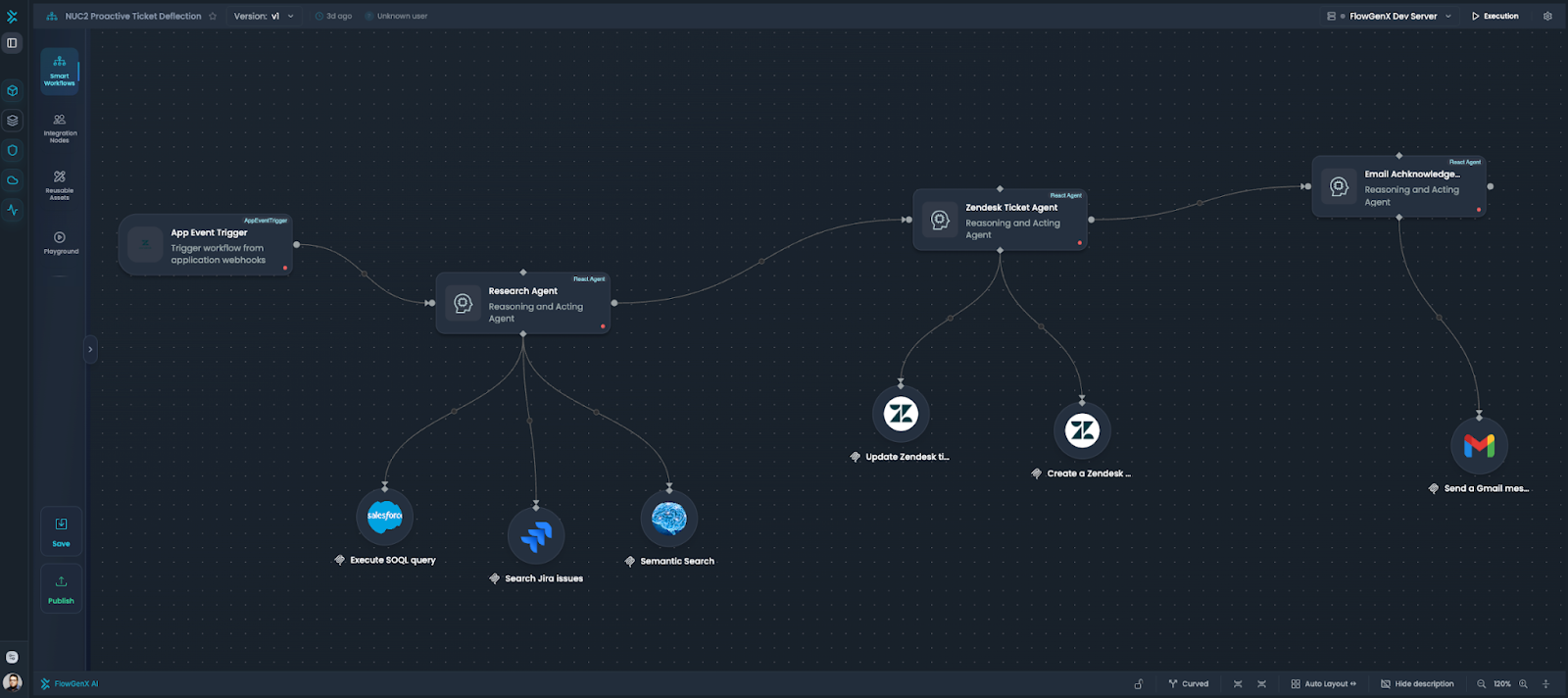
For platform administrators, this also means governance scales. Instead of reviewing custom connector code scattered across workflows, MCP tools in the gallery are vetted once. A2A agents can have platform-level access policies. The credential vault handles authentication consistently.
What This Means for Your Organization
If you're already running data workflows, or thinking about how AI fits into your data operations, consider these questions:
Are you rebuilding integrations for each workflow? MCP tools provide reusable connectors that work across all your workflows.
Can you leverage external AI capabilities? A2A lets your workflows call specialized agents without building everything in-house.
Could your workflows serve other teams? Exposing workflows as A2A agents makes your work reusable across your organization.
How quickly can you adapt to new data sources? The MCP Tools Gallery approach means checking for existing tools before writing custom code.
FlowGenX's integration of MCP and A2A doesn't replace your workflow platform—it extends what you can build with it. Your existing workflows keep running. Your credential management still works. You just gain access to a broader ecosystem of tools and agents.
Getting Started with MCP and A2A in FlowGenX
If you're already using FlowGenX, start experimenting:
- Browse the MCP Tools Gallery for a connector you currently maintain custom code for
- Replace one custom integration with an MCP tool in an existing workflow
- Measure the difference in maintenance time and reliability
- Explore A2A capabilities (coming soon) for workflows that could benefit from specialized AI agents
If you're evaluating workflow platforms, consider how MCP and A2A support affects your integration roadmap. The protocols are open standards, but having them built into your workflow platform means less infrastructure to manage.
The goal isn't to chase the latest protocols - it's to spend less time on integration plumbing and more time on workflows that drive business value.
Already using FlowGenX? Check out the MCP Tools Gallery in your dashboard. New to FlowGenX? [Learn more about our platform] or [schedule a demo] to see how workflow automation meets the AI agent ecosystem.

Join the conversation with your LinkedIn or Google account